
The Best Cal AI Alternatives in 2026, Free and Paid
Short answer: the best free Cal AI alternative is SnapCalorie, which logs up to 3 meals a day from a photo at no cost. For the smartest calorie targets, MacroFactor logs food by photo or description and adapts your targets to your measured expenditure ($71.99 a year). MyFitnessPal, Lose It!, Cronometer and Foodvisor all log meals from photos too, but only on their paid plans. If you also lift, ego (our app) pairs photo, barcode and chat logging with a strength plan that suggests your working weights.
Cal AI made photo calorie counting mainstream, and then MyFitnessPal bought it. If you're looking for an alternative, you're probably uneasy about where the app goes next, tired of paying for one job, or missing something it doesn't do. This guide compares eight apps on how they log food, what you get free, and what they cost in the US.
Choosing between Cal AI and MyFitnessPal? Read the head-to-head: Cal AI vs MyFitnessPal.
The 8 Cal AI alternatives at a glance (November 2026)
| App | Photo logging | What's free | US price | Best for |
|---|---|---|---|---|
| ego (our app) | Yes, plus barcode and chat | Builds your plan; logs 1 workout and 2 meals | $49.99/yr (3-day trial); $29.99/yr nutrition only | Lifters who want food and training in one app |
| SnapCalorie | Yes, plus voice and LiDAR | 3 AI logs a day | $19.99/mo or $149/yr listed; cheaper offers too | Free photo logging |
| MacroFactor | Yes, plus text, voice and barcode | Free trial only | $71.99/yr | Targets that adapt to your expenditure |
| MyFitnessPal | Meal Scan (Premium) | Manual logging | $79.99/yr Premium | The biggest food database |
| Cronometer | Photo Log (Gold) | Manual logging and barcode scanning | $59.99/yr Gold | Micronutrient detail, on the web too |
| Lose It! | Snap It (Premium, English only) | Manual logging and a calorie budget | $79.99/yr Premium | Simple calorie budgeting |
| Foodvisor | Photo analysis (Premium) | Manual logging | Varies by user | A photo diary on iPhone or Android |
| PlateLens | Yes | A daily photo-scan allowance | $34.99/yr on its site | Free scans plus web and Apple Watch apps |
What happened to Cal AI?
MyFitnessPal announced its acquisition of Cal AI on March 2, 2026, as reported by TechCrunch. The deal reportedly closed in December 2025 after nearly a year of talks. Cal AI, built by two teenagers and grown to more than 15 million downloads and over $30 million in annual revenue in under two years, now belongs to the biggest incumbent in calorie counting.
For now, MyFitnessPal says Cal AI stays a separate app connected to MyFitnessPal's food database, and it still has about 375,000 ratings averaging 4.8 on its US App Store listing. What changed is who controls the roadmap. Per the same TechCrunch report, MyFitnessPal's framing is that Cal AI serves people who prefer speed over accuracy, while MyFitnessPal serves people who want the reverse.
Is Cal AI still worth it in 2026?
If the only thing you want is the fastest possible photo food log, Cal AI is still good at that. The scanning flow is polished, and the acquisition didn't break anything.
The catch is price-to-scope. Its App Store listing states that "food scanning analysis results require a subscription," and Cal AI doesn't publish its prices. The listing shows its "Unlimited" plan at several prices from $2.99 to $29.99 without saying which period each one covers, and third-party breakdowns like eesel's 2026 pricing review report about $9.99 a month or $29.99 a year. You're paying for exactly one job, nutrition logging, with no training side at all.
Verdict: worth it if photo logging is your entire use case. If you also train, you need a second app and often a second subscription.
How we compared these apps
We read each app's own pricing, help and feature pages and its US App Store listing on November 9, 2026. We didn't run every app on the same meals, so treat this as a feature and price comparison rather than an accuracy ranking. Each app was checked against four questions:
- Photo logging. Can you log a meal from a picture, and what else speeds logging up (barcode, text, voice)?
- What's free. Does photo logging work without paying, and how much of it?
- Price. The US price as the vendor or the App Store lists it. Several apps vary prices per user, which we note.
- Beyond food. Training, platforms and anything else Cal AI doesn't do.
1. ego (our app): best if you also lift
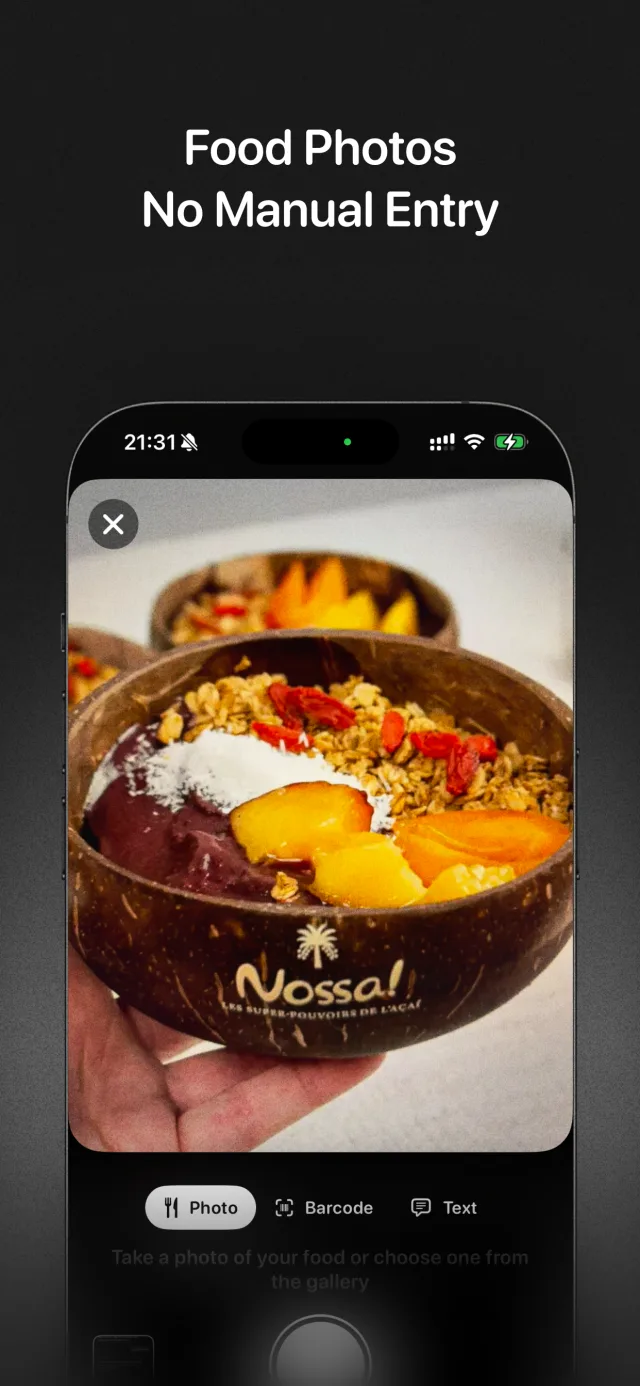
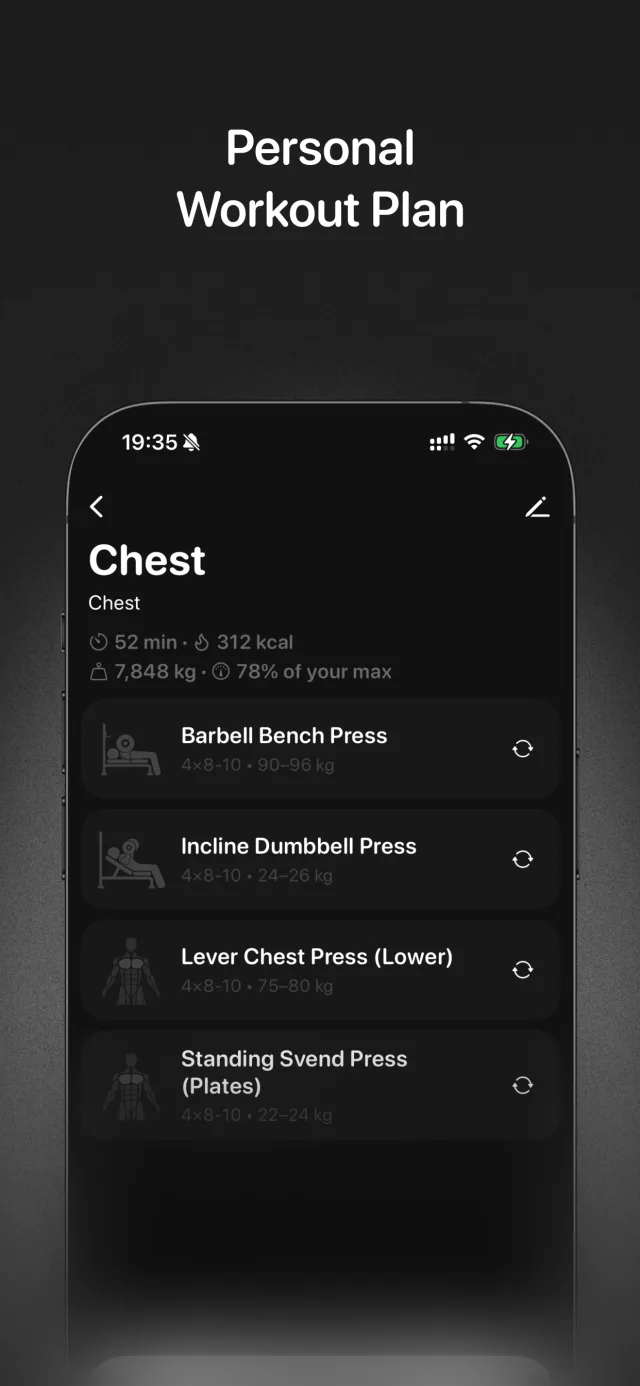
ego covers Cal AI's core job: snap a photo, get calories and macros, edit anything the AI got wrong. You can also scan a barcode or type the meal to the chat coach ("grilled chicken wrap and a Coke Zero"). The part Cal AI never had is training. ego builds a strength plan from your goal, experience and limitations, suggests a working weight for each exercise, and keeps a missed workout on your list for the week instead of making you restart. The coach reads your steps, sleep, active calories and workouts from Apple Health.
What it misses: ego is iPhone-only (iOS 18+), and it's far newer than Cal AI, with a small fraction of its ratings. Calorie targets come from your goal and body stats and recalculate when your weight or goal changes; they don't adapt to your expenditure the way MacroFactor's do. The free account builds your plan and logs 1 workout and 2 meals. After that, logging needs a subscription.
Price: $49.99 a year after a 3-day free trial, or $6.99 a week. If you only want food logging, Nutrition is $29.99 a year. Details are on the pricing page.
2. SnapCalorie: best free photo logging
SnapCalorie is "FREE for up to 3 AI logs per day," according to its FAQ. You snap a photo or dictate a voice note, and its App Store listing says it uses the LiDAR depth sensor on iPhone Pro models to "measure exact food volume." The same listing describes a database of "500k+ foods verified against USDA data."
What it misses: nutrition only, with no training. Price: the US App Store lists Premium at $19.99 a month or $149 a year, alongside several cheaper offers, so check the price the app shows you. Available on iPhone and Android.
3. MacroFactor: best for targets that adapt to you
MacroFactor's App Store listing says you can "log food by AI photo, meal description, speech-to-text, barcode scanner, or nutrition label scanner." Its calorie targets adapt to your measured expenditure, estimated from what you log and how your weight moves, which is the main reason people pick it over a simple tracker.
What it misses: "MacroFactor has a free trial, but does not offer a free subscription tier." Training lives in a separate MacroFactor Workouts app. Price: $11.99 a month or $71.99 a year. Available on iPhone and Android.
4. MyFitnessPal: the company that owns Cal AI
MyFitnessPal's Meal Scan "uses your camera to recognize everything on your plate," per its website, and its App Store listing counts "20.5M+ foods." It also logs workouts. Since March 2026 it owns Cal AI, so moving here keeps you with the same company. We compare the two in Cal AI vs MyFitnessPal.
What it misses: Meal Scan and barcode scanning are Premium features; the free version is manual search logging, and there's no training plan. Price: Premium is $19.99 a month or $79.99 a year on the US App Store.
5. Cronometer: best for micronutrient detail
Cronometer is the tracker for people who care about vitamins and minerals, not just calories and macros. Its Gold plan adds Photo Log, and the free version still lets you "scan barcodes for free," per its App Store listing. It also runs on the web.
What it misses: photo logging is Gold-only, and there's no training plan. Price: Gold is $59.99 a year.
6. Lose It!: best for simple calorie budgeting
Lose It!'s free Basic plan gives you a daily calorie budget and its food database, which its App Store listing puts at "56+ million items and recipes." Photo logging, called Snap It, is part of Premium.
What it misses: Snap It "is exclusively available to Premium members, and is currently only available if your device's language is set to English," per its help center. Price: Premium is $79.99 a year, with no monthly plan listed.
7. Foodvisor: a photo diary with a free manual tier
Foodvisor's Premium plan includes "meal analysis with photos": "simply take a picture of your meal to receive a detailed nutritional breakdown," according to its help center. The free version lets you log meals manually in the food diary.
What it misses: photo analysis needs Premium, and there's no web version. Price: Foodvisor says "we cannot provide a fixed universal price," and its US App Store listing shows several plans, so check the price in the app. Available on iPhone and Android.
8. PlateLens: free daily scans on more devices
PlateLens analyzes a meal from a single photo and is "free forever with daily photo-scan and coach-message allowances," per its pricing page, which doesn't say how many scans a day that is. It runs on iPhone, Android, Apple Watch and the web, and comes with an AI coach.
What it misses: nutrition only, and it publishes accuracy claims that we haven't verified. Price: its site lists $9.99 a month or $34.99 a year; the US App Store lists Premium at $19.99 and $79.99.
Is there a free Cal AI alternative?
Yes, with limits. SnapCalorie's free plan covers 3 AI photo logs a day, and PlateLens has a free daily photo-scan allowance, though it doesn't publish the number. ChatGPT's free plan can estimate calories from a meal photo with a limited number of uploads, but it keeps no food diary and no daily target, so the number goes nowhere.
Beyond that, the free tiers of MyFitnessPal, Lose It!, Cronometer and Foodvisor are manual: you search a database and enter portions yourself, and Cronometer's free tier also scans barcodes. ego isn't a free alternative either. A free account logs 2 meals, and after that, logging needs a subscription.
How accurate are Cal AI alternatives?
Cal AI's FAQ says it is "about 80% accurate," without saying how that's measured. Every photo app guesses portion size from a flat image, so hidden oil, sauces and mixed dishes cause the biggest misses.
We tested ego on 506 dishes with weighed ingredients from Google's public Nutrition5k dataset, sending a photo of each dish plus a note naming its ingredients. The median error was 23% per dish, and 14% on the total for a day of four dishes, because over- and underestimates partly cancel out. The method, limitations and per-dish data are in our photo calorie accuracy test. We couldn't run the other apps on the same dishes, so this isn't a ranking. For the published research across apps, see how accurate AI calorie counters are.
How to switch from Cal AI to ego
- Download ego from the App Store
Get AI Fitness Coach: ego on your iPhone (iOS 18 or later). It's free to download; the subscription unlocks the full feature set.
- Set your goal and profile
Pick fat loss, muscle gain, or maintenance, then answer questions about your training experience, limitations, and activity level. ego uses this to build your strength plan and set daily calorie and macro targets, so there's nothing to import from Cal AI.
- Log your first meal by photo
Snap a photo of your plate and review the calories and macros ego returns. Everything is editable, so if a portion looks off, fix it in a couple of taps, exactly the habit you built in Cal AI.
- Use the barcode scanner and chat logging
Scan packaged foods with the barcode scanner, and type meals to the chat coach when a photo is awkward, like a protein shake or restaurant leftovers you already ate.
- Connect Apple Health
Let ego read your steps, sleep, active calories, and workouts so its coaching reflects your real days. Completed workouts save back to Apple Health automatically.
Frequently asked questions
Is there a free Cal AI alternative?
Is Cal AI shutting down after the MyFitnessPal acquisition?
What is the best Cal AI alternative for people who lift weights?
How accurate is Cal AI?
Can I move my Cal AI history into a new app?
Log meals like Cal AI. Train like it counts.
ego is free to download on iPhone (iOS 18+). Snap photos of your meals, scan barcodes, and follow a strength plan that adapts when life gets in the way. Full features unlock with a subscription.

Not ready to install? Try the free AI workout plan generator in your browser. No sign-up needed.