Is There an App That Tells You How Much Weight to Lift?
Searching for an app that tells you how much weight to lift usually means one of two things: you're new and have no idea where to start, or you've been guessing for months and suspect the guesses are costing you progress. This guide gives you starting numbers you can use today, simple checks to tell whether a weight is right, and how ego's AI coach picks and updates working weights for you.
Short answer: Yes. A few apps genuinely prescribe weights instead of just logging them: ego suggests a working weight for every exercise in your plan and adjusts it based on the sets you log, and Fitbod does something similar from your training history. No app can know your strength on day one, though. Treat the first week as calibration: start with the suggestion, adjust until your last rep feels like you had two or three left, and the numbers get sharper from there.
How Much Weight Should I Lift as a Beginner?
Start lighter than you think. For barbell lifts, the standard bar weighs 45 pounds, and that is a legitimate first working weight for squats, bench press, and overhead press. Deadlifts are the exception: pulling an empty bar from the floor puts you in an awkward position, so most beginners start around 95 pounds (the bar plus a 25-pound plate per side).
For dumbbell work, these ranges cover most untrained adults:
- Goblet squat: 15-35 lb
- Dumbbell bench press: 15-30 lb per hand
- One-arm row: 15-30 lb
- Shoulder press: 10-20 lb per hand
- Curls and lateral raises: 8-15 lb
The two-set test
- Pick a weight from the low end of the range and do one set of 8-10 reps.
- Rate it honestly. Could you have done five or more extra reps? Add weight and repeat. Did you finish with two or three reps left in the tank? That's your working weight. Did your form break down before rep 8? Go lighter.
From there, progress is simple: when you hit the top of your rep range on every set, add about 5 pounds to upper-body lifts and 10 pounds to lower-body lifts next session. As a true beginner you can often do that weekly for the first couple of months.
How Do I Know If I'm Lifting Enough Weight?
The most useful gauge is reps in reserve (RIR): how many more reps you could have done when you racked the weight. For most working sets, you want 1-3 reps in reserve. Finish a set feeling like you had 5+ left, and you're training too light to force adaptation. Grind to absolute failure on every set as a beginner, and your form and recovery usually pay for it.
Three quick checks:
- Bar speed. Your last 2-3 reps should move visibly slower than your first ones. If every rep looks identical on video, the weight is too light.
- Rep drop-off. If you get 10, 6, then 4 reps across three sets, the weight is too heavy for that rep target.
- The four-week test. Look at your log. If the weights on your main lifts haven't moved in a month and you're a beginner, something needs to change: load, effort, or recovery.
This effort-based approach is standard coaching practice, not a hack. NASM's guide to RPE and RIR autoregulation notes that a 1-rep max simply isn't stable in people new to training, which is why anchoring sets to reps in reserve works better for beginners than percentages of a max you don't have yet.
Working Weight Calculator vs. an App That Adapts
A working weight calculator is usually a 1RM estimator: you enter a weight and how many reps you did, and it estimates your one-rep max with a formula like Epley (weight × (1 + reps ÷ 30)). Then you train at some percentage of that max. Useful for experienced lifters, but it has two problems for beginners: you need a rep-max set to plug in, and your strength changes week to week, so the number goes stale fast.
Apps handle this differently, and it's worth knowing who does what:
- Strong and Hevy are excellent loggers that show what you lifted last time, but the weight decision stays with you.
- Fitbod recommends weights based on your logged history and available equipment.
- Juggernaut AI prescribes loads well but is built for powerlifters focused on squat, bench, and deadlift.
- ChatGPT can write a plan with suggested weights, but it can't see whether you actually lifted them, so it never corrects itself. We compared this in detail in our ChatGPT workout plan guide.
The real dividing line is static vs. adaptive, not calculator vs. app: does the number update automatically from what you actually did last session?
ego: An App That Tells You How Much Weight to Lift
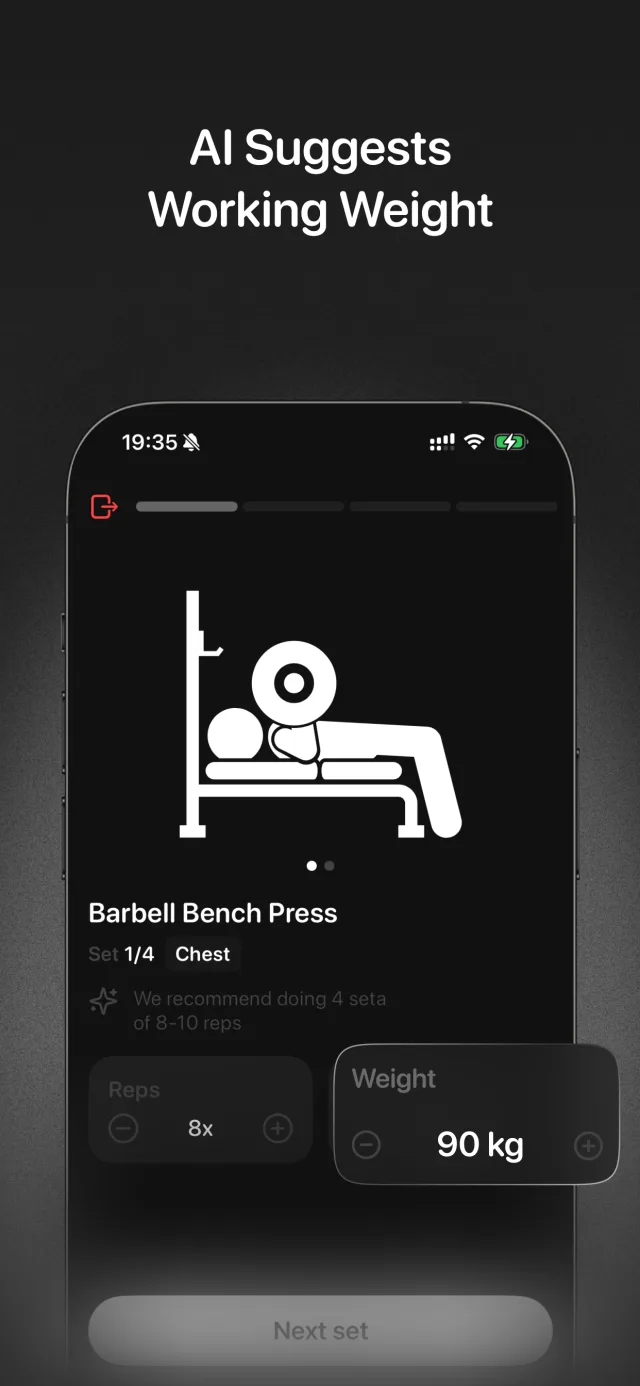
ego builds a personalized strength plan from your goal (fat loss, muscle gain, or maintenance), experience level, limitations, and activity level, and the AI suggests a working weight for every exercise in that plan. You're not staring at a blank field on day one.
The suggestions aren't fixed. As you log sets, ego updates your weights from your actual performance, and post-workout insights show you what moved. Life gets factored in too: if you miss sessions, the plan adapts automatically instead of making you restart, and the suggested loads adjust with it. The AI chat coach reads your Apple Health steps, sleep, and workouts, so you can ask things like "why did my squat weight drop this week" and get an answer grounded in your data. And since strength progress stalls fast when you undereat, ego pairs the training side with photo meal logging and macro targets. Here's how tracking calories and workouts together works.
To be straight about cost: ego is free to download on iPhone (iOS 18+), and the subscription unlocks the full experience: personalized plan generation with weight suggestions, smart nutrition tracking, and analytics. There's no Android version.
How to Get Working Weight Suggestions with ego
- Download ego and answer the onboarding questions
Get ego on the App Store and tell it your goal, training experience, any limitations, and activity level. This is what the AI uses to set your first weights, so answer honestly: "beginner" gets safer starting loads than "advanced".
- Open your first workout and check the suggested weights
Each exercise in your plan comes with a suggested working weight. That's your starting point, not a command.
- Calibrate during session one
Do your first set at the suggested weight and rate it: you want 2-3 reps left in the tank. Too easy or too hard? Edit the weight right in the app and keep going. Expect the first week to be a calibration period.
- Log every set
The suggestions only get smarter if the app knows what you actually lifted. Log your real weights and reps, including the ugly sets, and ego updates future targets from that performance.
- Use insights and the chat coach to sanity-check
After each session, post-workout insights show how you performed. If a number ever seems off, ask the Ego Agent in chat. It can explain your plan and sees your Apple Health sleep and activity data for context.
Frequently asked questions
What weight should I start with if I've never lifted before?
Does ego suggest a weight for every exercise?
What if the app's suggested weight feels too heavy or too light?
Is a 1RM calculator enough to pick my working weights?
Stop guessing at the weight rack
Download ego on the App Store, answer a few questions about your goal and experience, and get a strength plan with a suggested working weight for every exercise, and the weights update from what you actually lift. Free to download on iPhone (iOS 18+); subscription unlocks the full plan, weight suggestions, and nutrition tracking.